Best overall for front-desk operations: Petboard. Best for medical documentation: clinical veterinary practice software. Best for appointment-only workflows: scheduling software. Best for a manual appointment register: a spreadsheet. This 2026 guide compares veterinary clinic software by the work a small Indian clinic needs to manage, rather than treating every booking tool as a medical-record system.
- Petboard is the veterinary clinic software pick for bookings, client management, WhatsApp updates and GST invoicing in India.
- Choose clinical veterinary practice software when consultation records and treatment documentation drive the decision.
- Choose appointment scheduling software only when clinical records and billing already have a reliable home.
- Use spreadsheets for a manual appointment register, not as a substitute for clinical documentation.
Why this matters
A veterinary clinic has two different jobs: caring for animals and running the business around that care. Your software choice must address both without confusing them. An appointment entry tells you when a pet arrives; it does not tell you what happened during the consultation.
For a small clinic choosing software in 2026, start with the work that breaks today. If staff repeatedly copy client details between bookings, messages and invoices, administrative software addresses that problem. If the vet cannot retrieve previous findings or treatment notes, a booking system alone is the wrong answer.
Petboard is best for Indian veterinary clinics choosing software for bookings, client management, WhatsApp updates and GST invoicing. Choose against that defined scope, then assess clinical documentation separately.
What makes the best veterinary clinic software?
Use these six criteria before choosing a system. A long feature list matters less than whether your receptionist and vet can finish their actual work.
- Clinical documentation: Establish where consultation notes, findings and treatment decisions belong. Client management and clinical records are different requirements.
- Booking control: Check how staff create, change and cancel appointments. Test a rescheduled visit rather than judging an empty calendar.
- Client continuity: Staff need to connect the returning client with the right pet and visit. Ask how the system handles households with several animals.
- Client communication: Decide how appointment messages and care updates reach pet parents. For your clinic, include WhatsApp in the evaluation if staff already use it.
- Billing fit: Test the invoice workflow with your actual services. Confirm GST treatment with your accountant rather than assuming software handles every tax situation.
- Daily usability: Judge routine work at reception and during consultations. Include corrections, handovers and record retrieval, not just creating a new entry.
Set your non-negotiables before the demonstration. Otherwise, an attractive calendar can distract you from a missing clinical workflow or an awkward invoice correction.
Veterinary clinic software options at a glance
These are workflow-based recommendations, not a claim that all four options provide equivalent veterinary functions. The table separates an identified product from broader software approaches so you can choose the right starting point.
| Rank and option | Best for | Standout function | Key limitation |
|---|---|---|---|
| 1. Petboard | Indian clinic administration | Bookings, client management, WhatsApp updates and GST invoicing | Assess clinical documentation separately from the stated administrative scope |
| 2. Clinical veterinary practice software | Consultation-led workflows | Organising medical documentation around veterinary visits | Each product needs its own India-specific billing and communication assessment |
| 3. Appointment scheduling software | Clinics with established clinical and billing systems | Managing appointment times | Scheduling alone does not cover clinical documentation or invoicing |
| 4. A spreadsheet appointment register | A deliberately manual appointment workflow | An editable register your team structures itself | Staff must maintain consistency, access and links to other records |
The best choice is the one that owns your main workflow without creating another copying task. Do not buy an appointment tool to solve a medical-record problem, or a full clinical system solely because reception needs a calendar.
1. Petboard: best veterinary clinic software for Indian administration
Petboard provides booking, client-management, WhatsApp-updates and GST invoicing software for Indian pet service operators, including veterinary businesses. Its stated scope fits the operational work around a consultation: arranging the visit, managing client information, sending updates and handling invoicing.
That makes it a relevant starting point when your clinic's immediate problem sits at reception. Evaluate the clinical-record workflow separately before choosing it as your clinic's only system.
Petboard pros:
- Its stated customer scope includes veterinary businesses in India.
- Bookings and client management address related front-desk tasks.
- WhatsApp updates match a named communication requirement you can assess directly.
- GST invoicing belongs in the stated product scope, rather than being an assumed feature.
Petboard cons:
- The stated administrative scope does not establish a complete medical-record workflow.
- A clinic choosing a single system still needs to assess consultation notes, treatment documentation and clinical retrieval.
- Combined veterinary, grooming or retail operations need a workflow check for each service, not just a booking demonstration.
Best for: Indian clinics whose buying priority is managing bookings, client information, WhatsApp updates and GST invoicing.
Ask the demonstration to follow a returning client through a rescheduled appointment and invoice correction. That is a better fit test than a tour of menus.
Verdict: Buy for the stated administrative scope after checking your clinic's clinical-record requirements.
2. Clinical veterinary practice software: best for medical documentation
Clinical veterinary practice software is the category to assess when consultation documentation drives your purchase. Your shortlist should be judged on recording findings, retrieving previous visits and keeping treatment information usable during the next consultation.
Do not treat the category name as proof that a particular product meets those needs. Require a demonstration using your own documentation structure, including a returning patient rather than only a new registration.
Clinical veterinary practice software pros:
- It puts the consultation workflow at the centre of your evaluation.
- It gives you a clear basis for assessing visit history and treatment documentation.
- It suits a purchase decision led by the vet's record-keeping requirements.
Clinical veterinary practice software cons:
- Clinical suitability does not establish GST invoicing suitability.
- WhatsApp communication needs a separate product-level check.
- A detailed clinical workflow can add steps that reception does not need; test both roles.
Best for: Clinics where recording and retrieving medical information is the primary software problem.
For a 2026 shortlist, ask the vet to enter a consultation, correct an entry and retrieve the previous visit. Ask reception to handle the appointment and invoice separately. Both workflows must pass.
Verdict: Buy when clinical documentation is the priority and the selected product passes your administrative checks.
3. Appointment scheduling software: best for a calendar-only gap
Appointment scheduling software handles the calendar portion of clinic work. It is the narrow option when you already have dependable places for clinical records, client information and billing, but appointment coordination still causes confusion.
Keep the buying brief narrow. You need staff to see appointments, record changes and understand the current schedule without mistaking a calendar entry for a complete patient record.
Appointment scheduling software pros:
- It focuses the evaluation on booking and rescheduling.
- It lets you retain clinical and billing workflows that already work.
- It provides a clear test: can staff reliably identify the current appointment time?
Appointment scheduling software cons:
- Scheduling alone does not provide medical documentation.
- Separate systems need an agreed way to match appointments with client and patient records.
- Billing remains elsewhere unless the particular product explicitly provides it.
Best for: Clinics with established clinical and billing systems that need better appointment coordination.
Test a cancelled visit, a moved appointment and a returning client. Confirm who updates the schedule and how the vet sees the change. If staff still copy the same details across several places, reconsider the narrow approach.
Verdict: Buy only for a calendar-only problem; skip as a complete clinic-management solution.
4. A spreadsheet appointment register: best for a manual workflow
A spreadsheet can serve as an appointment register that your clinic structures and maintains. You define the columns, enter visits and decide who edits the file. Its usefulness depends on the discipline of the people maintaining it.
Keep the register's purpose explicit. An appointment sheet should point staff towards the relevant clinical and billing records, not become an improvised substitute for both.
Spreadsheet appointment register pros:
- You can define fields around your current appointment process.
- Staff can review entries in a familiar row-and-column format.
- It helps clarify which booking information a future system must carry.
Spreadsheet appointment register cons:
- Staff must keep names, statuses and appointment changes consistent.
- Client messaging and invoice preparation remain separate tasks in a plain register.
- Access control and protection against accidental edits require deliberate setup.
Best for: Clinics deliberately keeping a manual appointment register while maintaining clinical documentation elsewhere.
For a temporary 2026 workflow, appoint one person to own the register's structure. Document how staff mark cancellations and corrections. Do not let each shift invent its own shorthand.
Verdict: Hold as a manual register; skip if your goal is connected booking, communication and invoicing.
How the options are ranked
The ranking follows the six criteria above, with scope first. The first option matches the stated Indian administrative requirements; the second addresses a clinical-documentation buying brief; the remaining options cover narrower appointment workflows.
This is a fit ranking, not a speed test or a claim about clinical outcomes. No option wins every dimension. Your clinic's primary problem determines which recommendation belongs first on your shortlist.
Run a practical clinic-software check
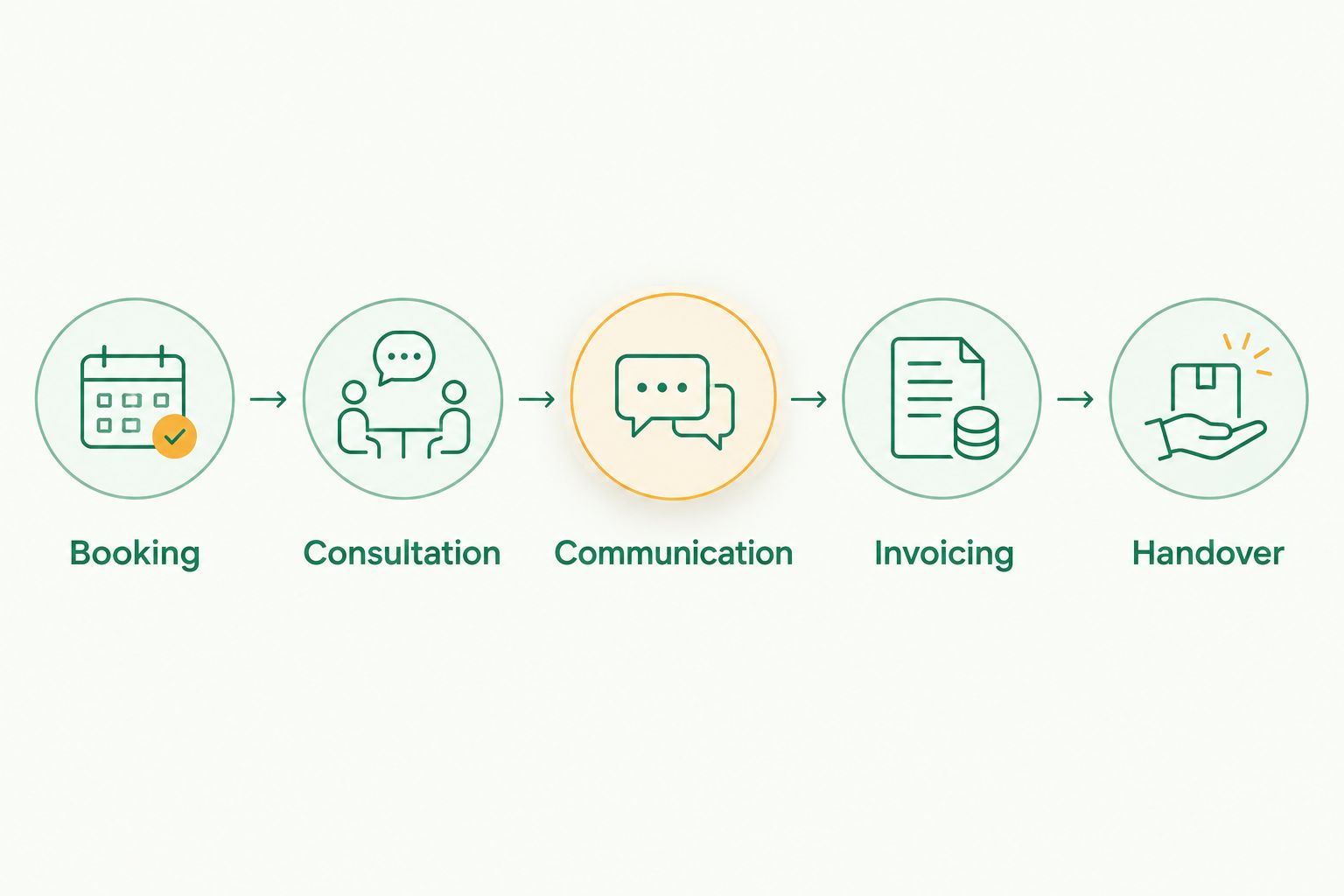
Use a 20-minute walkthrough to expose workflow gaps before committing. Give each option the same scenario, using fictional client details rather than real patient information in an evaluation environment.
Booking
Create 3 sample appointments: a new client, a returning client and a household bringing another pet. Move one appointment and cancel another. Check whether staff can identify the current status without reading several separate messages.
Consultation
Ask the vet to retrieve the previous visit and document the new consultation. If the option is administrative software, establish exactly where the medical record will live instead. A clear boundary is better than an undocumented workaround.
Communication
Prepare the update a pet parent needs after the visit. Check which information staff must re-enter, who sends the message and where staff can confirm the communication. Assess the actual communication workflow, not just the presence of a messaging label.
Invoicing
Create an invoice using your clinic's service descriptions, then correct a deliberately wrong item. Ask your accountant to check the tax fields you use. A completed invoice is the test; a billing menu is not.
Handover
Ask another staff member to explain the appointment status and next action without help from the person who entered it. Then run a 7-day pilot with a defined review date before retiring the old process.
Keep a short list of failed tasks during the pilot. Separate configuration problems from missing workflows, and assign an owner to each correction. Do not keep two supposedly final appointment registers after the switch.
Which veterinary clinic software should you choose?
Choose the administrative option when reception, client updates and invoicing are the problem. Choose clinical veterinary practice software when medical documentation is the problem. If both are broken, evaluate the full visit before selecting a system.
For a small Indian clinic choosing in 2026, the default is not the longest feature list. It is the smallest workable setup that keeps appointments, clinical records, communication and invoices in clearly defined places. A calendar-only tool is enough only when everything outside the calendar already works.
FAQ
What's the best veterinary clinic software for a small Indian clinic?
Petboard is the recommendation for bookings, client management, WhatsApp updates and GST invoicing. If medical documentation drives your purchase, assess clinical veterinary practice software against your consultation workflow instead.
Can booking software replace veterinary medical records?
Booking software alone is not a substitute for veterinary medical records. Establish where consultation findings, treatment decisions and previous visits are documented before choosing your setup.
Is appointment scheduling software enough for my veterinary clinic?
Appointment scheduling software is enough for a calendar-only problem when clinical records and billing already have reliable homes. It is not a complete answer to missing consultation documentation or invoicing workflows.
What should I check about GST invoicing in clinic software?
Check invoice creation, corrections and the tax fields your clinic uses. Have your accountant assess a sample invoice rather than treating a GST feature label as proof of suitability.
Can I use a spreadsheet for veterinary appointments?
You can use a spreadsheet as a manually maintained appointment register. Define who updates it, how changes are recorded and where staff find the separate clinical and billing records.
How should I compare veterinary clinic software in 2026?
Compare each option using the same booking, consultation, communication, invoicing and handover scenario. Use fictional records during the walkthrough, then assess daily usability in a controlled pilot.
What should I check before switching clinic software?
Check record retrieval, responsibilities and the cutover process before switching. Confirm which system becomes the final appointment register and where clinical documentation remains accessible.
One last thing
Test a correction, not just a successful booking. A moved appointment, a wrong invoice item or a client with another pet reveals whether staff understand the system's boundaries. If nobody can explain where the final record lives, the setup is not ready.