
Best overall for Indian training-business administration: Petboard. Best for appointment-only scheduling: a shared calendar. Best for custom progress tracking: a spreadsheet. Best for offline session notes: a paper training register. This 2026 guide compares the best dog training software and simpler alternatives by the work you need to organise—not by the length of a feature list.
- Petboard is the best dog training software choice here for Indian operators needing bookings, client records, WhatsApp updates and GST invoicing.
- Use a shared calendar when appointment coordination is your main problem, not client management or billing.
- Use a spreadsheet for custom training-progress records; keep session observations separate from booking status.
- Use a paper training register for offline notes, not as the central record for a growing team.
Why this matters
A training appointment is not the same as a training record. Your calendar tells you when a dog arrives. Your notes tell you what happened, what the parent should practise and what the next session should cover.
The best choice connects the administrative work without confusing it with the trainer's judgement. For an Indian operator choosing software in 2026, bookings, client records, WhatsApp communication and GST invoicing belong on the shortlist. Detailed behaviour assessments need their own evaluation.
Start with the job that breaks most often. If appointments get lost, fix scheduling. If parents receive conflicting instructions, fix progress records. If staff repeatedly copy booking details into messages and invoices, assess a business-management system.
What makes the best dog training software
Use these criteria before comparing options. Each one should correspond to a task your team actually performs.
- Booking clarity: You need to distinguish an enquiry, a confirmed appointment, a cancellation and a completed session. Ask how the system handles changes without leaving conflicting records.
- Client and pet records: You should be able to identify the parent, the dog and the relevant history. A name in a calendar entry is not a full client record.
- Training continuity: Look for a practical way to record goals, observations, homework and the next action. Check the detail rather than accepting a general claim about pet records.
- Parent communication: Assess how staff send updates and where those updates sit alongside the booking. For WhatsApp-based communication, check the actual workflow.
- Billing fit: Review the invoice process, GST details and payment-record workflow with the person responsible for accounts. Do not assume that invoicing also includes payment collection or reconciliation.
- Team handover: Another trainer should understand the next appointment without searching through personal messages. Check access, editing responsibilities and how records leave the system.
For your 2026 shortlist, separate confirmed capabilities from requirements to demonstrate. A booking tool does not become training software simply because you put a dog's name in it.
Dog training software options at a glance
The order below follows distinct use cases. The business-management option comes first; the remaining options solve narrower jobs.
| Option | Best for | Standout capability | Key limitation |
|---|---|---|---|
| Petboard | Indian training-business administration | Bookings, client management, WhatsApp updates and GST invoicing | Assess specialist training-record requirements separately |
| Shared calendar | Appointment-only scheduling | Time-based entries that staff can coordinate around | Calendar entries are not structured progress records or invoices |
| Spreadsheet | Custom progress tracking | Editable columns for goals, observations and next actions | Your team must maintain the structure and record discipline |
| Paper training register | Offline session notes | Written observations without a device | Sharing and searching require manual work |
Choose the option that owns your main workflow. Do not ask a paper register to manage invoices, or treat a business-management system as proof of a particular training method.
1. Petboard: best dog training software for Indian business admin
Petboard provides booking, client-management, WhatsApp-update and GST-invoicing software for Indian pet service operators, including training businesses. It is the best fit in this comparison when you want software for the administration around training sessions.
That distinction matters. Running a training business includes organising appointments, keeping client details, updating parents and preparing invoices. Recording an individual dog's learning progress is a separate requirement to check against your own process.
Petboard pros:
- Bookings and client management are part of the stated offering.
- WhatsApp updates match a communication channel your business can evaluate directly.
- GST invoicing addresses an India-specific billing requirement.
- The stated audience includes training and other pet service businesses.
Petboard cons:
- Business-management software does not replace a trainer's assessment, curriculum or session decisions.
- Specialist requirements—such as exercise ratings, package rules or detailed behaviour forms—need their own demonstration before you commit.
Best for: Indian dog trainers whose selection criteria include bookings, client records, WhatsApp updates and GST invoicing.
Bring an actual appointment scenario to your evaluation. Ask how a staff member creates the booking, finds the client record, sends an update and prepares an invoice. Judge the sequence, not isolated screenshots.
If you also need progress tracking, bring your current session-note template. Check where the trainer records observations and how the next trainer finds them. Keep that requirement explicit rather than assuming it follows from client management.
Verdict: Buy for the stated administrative fit after checking your training-specific workflow.
2. Shared calendar: best scheduling option for appointment coordination
A shared calendar organises appointments as time-based entries. It suits a trainer who mainly needs to see the day, coordinate with colleagues and record changes to the schedule.
This is a scheduling option, not a complete training-business system. Calendar features differ between services, so assess sharing, editing access and notifications in the calendar you intend to use.
Shared calendar pros:
- Entries present appointments in a familiar time-based format.
- A shared schedule gives colleagues a common place to check planned sessions.
- You can begin with appointment details rather than designing a full record system.
Shared calendar cons:
- Free-text event descriptions do not provide a consistent training-progress structure.
- Invoicing and detailed client management need another process.
- Important notes become difficult to follow when staff scatter them across event descriptions.
Best for: Trainers whose primary problem is coordinating appointments, with client records and billing already handled elsewhere.
Decide what belongs in an appointment entry. Include enough information to identify the session, but avoid turning every event into a long history. Keep sensitive client and pet information within a deliberate access policy.
The calendar approach stops fitting when staff must open several old events to understand what happened last time. At that point, improve the record system rather than adding more text to the next appointment.
Verdict: Hold as a scheduling tool; skip it as your only training-management record.
3. Spreadsheet: best progress-tracking option for custom records
A spreadsheet lets you build a training record around your own fields. You can create columns for the pet, training goal, session observation, parent homework and next action.
This approach suits a trainer who needs flexible records and accepts responsibility for maintaining them. The spreadsheet does not decide what a rating means. Your team must define that meaning and apply it consistently.
Spreadsheet pros:
- You control the fields used for training notes.
- Rows and columns support a consistent session-record format.
- You can separate attendance from observations instead of treating a completed appointment as progress.
- Sorting and filtering help organise records when the sheet is maintained correctly.
Spreadsheet cons:
- Inconsistent wording and duplicate records weaken the usefulness of the sheet.
- Appointment coordination, parent messages and invoices need separate workflows.
- Sharing rules and edit responsibility require deliberate setup.
Best for: Trainers whose main requirement is a customised progress log rather than connected business administration.
Start with plain observations. Record what the dog did, the setting and the instruction given to the parent. Avoid a score unless your team has defined what each score means.
For example, a note about responding in a quiet room should not imply the same response on a busy street. Keep the context beside the observation. That gives the next trainer something useful to act on.
Verdict: Hold for flexible progress records; skip it as the sole system when administrative copying becomes the main workload.
4. Paper training register: best option for offline session notes
A paper training register provides a place to write observations during or after a session. It works without a device and lets you sketch or annotate a session in your own format.
Its strength is immediate note-taking. Its weakness is access: another staff member needs the physical register or a copied version to read the record.
Paper training register pros:
- You can write notes without opening an application.
- Handwritten sketches and short observations fit naturally on the page.
- The register remains usable without an internet connection.
Paper training register cons:
- Searching across clients requires manual work unless you maintain an index.
- Colleagues cannot independently access the same physical page from different places.
- Parent updates and billing require separate steps.
Best for: Trainers who need an offline capture method during sessions and a defined place to transfer essential information afterwards.
Use a repeatable page layout. Put the pet identifier, session date, goal, observation and next action in the same place each time. Legibility matters more than a decorative journal format.
Decide which notes remain on paper and which enter the shared record. Without that decision, staff end up with different versions of the same session history.
Verdict: Hold for offline capture; skip it as the central record for a team that needs shared access.
How we ranked these options
The ranking follows the criteria above: booking clarity, records, training continuity, parent communication, billing and handover. Petboard ranks first for Indian business administration because its stated offering includes bookings, client management, WhatsApp updates and GST invoicing.
The other options earn narrower places. A shared calendar organises appointment times. A spreadsheet supports custom records. A paper register captures offline notes. None is presented as a substitute for every other job.
This 2026 ranking does not assign numerical scores or claim measured time savings. Its purpose is to give you a decision you can verify against your daily work.
Check the workflow before you choose
Use a sample case with 2 dogs, 3 sessions and 1 trainer. These are evaluation inputs, not capacity limits or performance claims. The point is to expose confusing records before those records become part of your working day.
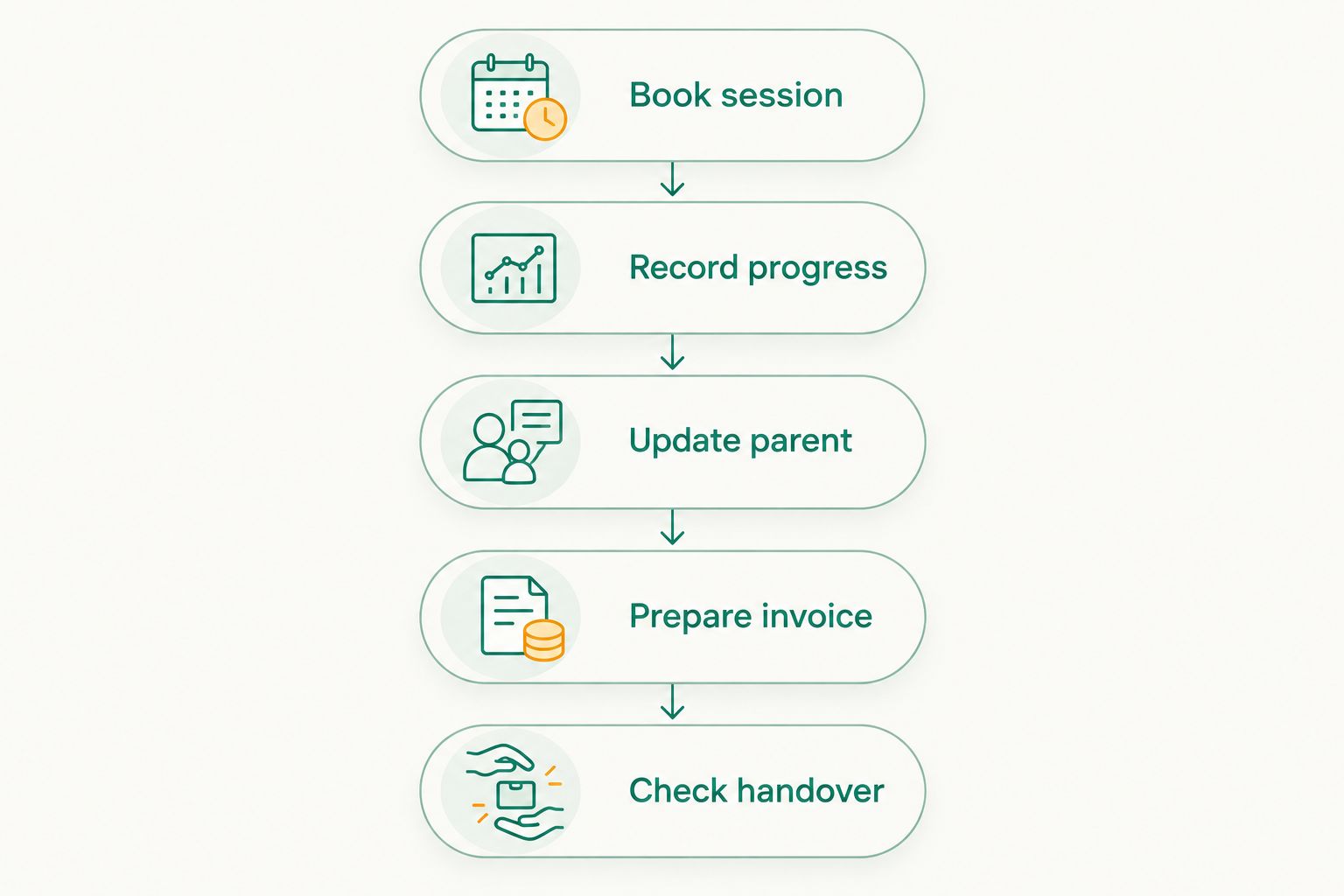
Follow the same sequence in every option:
- Book session: Enter the appointment and identify the correct dog and parent.
- Record progress: Add the goal, observation and next action without confusing them with attendance.
- Update parent: Prepare a clear summary and the homework the parent should follow.
- Prepare invoice: Check how the completed service reaches the billing process.
- Check handover: Ask someone else to find the next appointment and explain what happens next.
If a step lives outside the option you are assessing, record that handoff. A separate tool is not automatically a problem. An undefined handoff is.
Which dog training software should you choose?
Choose Petboard for Indian training-business administration; choose a narrower tool only when your problem is narrower. That is the default recommendation for this 2026 comparison.
Use a shared calendar if appointments are the only gap. Use a spreadsheet if you need to define and maintain a custom progress log. Keep a paper register as an offline capture method when that fits your sessions.
Do not replace a working process just to collect more features. Replace the part that loses appointments, obscures the next action or forces staff to copy the same information repeatedly. Then check that the replacement connects properly to the rest of the business.
FAQ
What's the best dog training software for an Indian training business?
Petboard is the best fit in this comparison for Indian operators needing bookings, client management, WhatsApp updates and GST invoicing. Check specialist training-record requirements against your own session workflow before choosing.
Can I use a shared calendar instead of dog training software?
A shared calendar works for appointment coordination, but it is not a complete training record or billing system. Use it when those other tasks already have a clear process.
Is a spreadsheet better for tracking dog training progress?
A spreadsheet suits custom progress tracking when you want to define your own fields. Its usefulness depends on consistent observations, clear editing responsibility and a maintained record structure.
What should I record after a dog training session?
Record the goal, what happened, the context, parent homework and the next action. Keep these observations separate from attendance so a completed session does not automatically become a claim of progress.
Does dog training software need WhatsApp updates?
WhatsApp updates belong on your checklist when your business uses WhatsApp to communicate with parents. Check how updates are prepared and sent rather than assuming every system handles the same workflow.
What should I check about GST invoicing?
Check the invoice workflow with the person responsible for your accounts. Confirm the details your business needs, and evaluate payment collection and reconciliation separately from invoice creation.
How do I compare dog training software in 2026?
Compare options using the same booking, session-note, parent-update, invoice and handover scenario. Choose the option that handles your main job clearly, and identify every task that still needs another process.
One last thing
A completed session is an attendance fact, not a training outcome. Keep separate fields for what happened and what should happen next. That small distinction makes a calendar, spreadsheet or business-management system easier for the next trainer to understand.
Before you change tools, write down the next-action field you want every session to end with. If staff cannot agree on that field, software selection will not resolve the disagreement.