
Best overall: Petboard for Indian home boarders who need bookings, client records, WhatsApp updates and GST invoicing together. Best for flexible recordkeeping: a spreadsheet; best for a schedule-only setup: a shared calendar; best for handwritten check-in notes: a paper diary. This 2026 guide compares pet boarding software for home boarders with those simpler alternatives.
- Petboard is the best fit here for Indian home boarders needing bookings, client management, WhatsApp updates and GST invoicing.
- Choose a spreadsheet for flexible boarding records, not as a substitute for a complete booking workflow.
- Choose a shared calendar for arrival and departure visibility; keep care instructions separately.
- Use a paper diary for handwritten check-in notes, not as your only growing client record.
Why this matters
Home boarding puts the booking desk inside your home. You take enquiries, discuss feeding, arrange arrivals, send updates and settle bills while caring for the animals already staying with you. A booking system should help you keep those commitments straight.
The practical question in 2026 is not which option has the longest feature list. It is which option lets you find the agreed dates, the right owner's details and the billing record without reconstructing the stay from messages.
Choose around the work you repeat, not the size of your premises. A home-based operation still needs clear records. A smaller setup does not remove the need to distinguish an enquiry from a confirmed booking.
What makes the best pet boarding software for home boarders
Use these criteria before choosing a system. They apply whether you board dogs, cats or both, and whether you work alone or share duties with someone else.
- Booking clarity: You should be able to identify the pet, owner, arrival and departure without reading an entire chat history.
- Client continuity: Returning clients should have a usable record. Check how the system connects owner details with the relevant pet information.
- Owner communication: Decide where boarding updates belong and how you will identify the correct recipient before sending them.
- Billing fit: Check whether the workflow suits your invoices and business records. Indian operators should assess their GST invoicing needs explicitly.
- Daily usability: Rehearse the tasks you perform during arrivals and departures. A system that is awkward during handover needs closer inspection.
- Record discipline: Decide who enters changes and where the final booking details live. Software cannot resolve contradictory instructions by itself.
Do not confuse a useful feature with a verified workflow. Having client management, for example, does not establish which medical fields, attachments or permissions a particular product provides. Inspect the details you actually need.
Home boarding options at a glance
The table compares different ways to organise the business, not interchangeable software products. The alternatives earn distinct roles rather than competing on an unsupported feature score.
| Option | Best for | Standout feature | Key limitation |
|---|---|---|---|
| Petboard | Indian home boarders wanting connected business administration | Bookings, client management, WhatsApp updates and GST invoicing | A business system does not replace care decisions or accurate data entry |
| Spreadsheet | Flexible boarding recordkeeping | Rows and columns you structure around your own records | You must maintain the booking, communication and billing process yourself |
| Shared calendar | Schedule-only arrival and departure planning | Events placed against dates and times | Calendar events are not a complete client or billing record |
| Paper diary | Handwritten check-in notes | Direct note-taking without a digital interface | Searching, sharing and revising handwritten records take manual work |
For a 2026 decision, start with the row that matches your main problem. If your problem spans bookings, clients, updates and invoices, do not judge a calendar as though it covers all four.
1. Petboard: best boarding software for Indian home operators
Petboard is software for Indian pet service operators. Its stated scope includes bookings, client management, WhatsApp updates and GST invoicing, which puts it directly in the business-administration category rather than the schedule-only category.
For a home boarder, that scope addresses work surrounding the stay. You need to organise the booking, maintain the client relationship, communicate with the owner and produce the appropriate billing record. Assess those tasks together instead of buying around a single attractive screen.
Petboard pros:
- Covers bookings and client management within its stated business scope.
- Includes WhatsApp updates, relevant when that is your owner communication channel.
- Includes GST invoicing for Indian operators assessing their billing workflow.
- Serves pet service businesses, including boarding and daycare.
Petboard cons:
- Requires accurate booking details and a consistent recordkeeping routine.
- Does not replace your judgement about suitable pets, care arrangements or household capacity.
- A dedicated business system is a broader choice than needed if you only want a dated reminder.
Before choosing in 2026, check the details beneath those broad capabilities. Ask how a returning client is identified, how a booking change is recorded, and what information appears on an invoice. If you need vaccination attachments, staff permissions or capacity controls, verify those requirements directly rather than assuming they are included.
Best for: Indian home boarders who want booking, client, communication and billing administration in a pet-business system.
Verdict: Buy if those are your recurring tasks, after checking the specific workflow you need.
2. Spreadsheet: best boarding option for flexible recordkeeping
A spreadsheet lets you organise boarding information in rows and columns. You choose the headings and can revise the structure when your recordkeeping needs change. It is a recordkeeping option, not automatically a complete boarding system.
Separate enquiries from confirmed stays. Otherwise, the sheet can contain dates without making clear whether you have actually accepted the booking. Keep care instructions identifiable rather than burying them in a general notes column.
Spreadsheet pros:
- Lets you choose fields that match your own booking records.
- Keeps similarly structured entries together for review.
- Supports a written distinction between booking status, dates and client details.
- Gives you a place to document the information you want in a future system.
Spreadsheet cons:
- Depends on someone maintaining the structure and updating each relevant entry.
- Does not turn a recorded phone number into an owner-update workflow by itself.
- Requires a separate plan for invoices, messages and care handovers.
The trap is treating a populated sheet as a finished process. A row can contain the correct departure date while your calendar still shows the old one. Decide which record controls the booking and check other records whenever that booking changes.
Use clear field names. Arrival, departure, booking status and owner contact are easier to interpret than an unlabeled collection of dates and numbers. Restrict the information you collect to what you need for the service and its administration.
Best for: Home boarders who want flexible records and accept responsibility for maintaining the surrounding process.
Verdict: Hold as a recordkeeping option; skip it as the sole answer to connected booking and billing needs.
3. Shared calendar: best boarding option for schedule visibility
A shared calendar puts arrivals, departures and other events against dates and times. Its strength is showing when something is due. Use it to answer a scheduling question, not to hold every detail about a pet's stay.
A home boarding booking also involves information that a date alone cannot communicate. Feeding instructions, owner details and billing records need an organised home of their own. Keep those records distinct from the event reminder.
Shared calendar pros:
- Gives arrivals and departures a dated place in the schedule.
- Helps separate handover appointments from general notes.
- Offers a schedule that participants can consult, subject to the calendar's sharing settings.
Shared calendar cons:
- Does not provide a complete boarding client record merely by creating an event.
- Can obscure the difference between an enquiry and an accepted stay unless you label it clearly.
- Requires care when choosing which details belong in shared event descriptions.
Calendar entries also need consistent naming. An event called boarding tells you less than an entry that identifies its purpose and points you towards the relevant booking record. Avoid putting sensitive information into an event simply because it is convenient.
If your 2026 problem is forgetting handover times, a calendar directly addresses that problem. If your problem is repeatedly finding client details, messages and invoices in separate places, it addresses only part of the work.
Best for: Home boarders whose main need is a visible arrival and departure schedule.
Verdict: Buy into the calendar workflow for scheduling; skip it as a complete boarding-management replacement.
4. Paper diary: best boarding option for handwritten check-in notes
A paper diary gives you a direct place to write during a handover. You can record an instruction, a question to clarify or a change discussed with the owner without opening a digital interface.
Its role needs a boundary. A handwritten note is useful only if it reaches the record you consult when caring for the pet. Decide whether the diary is your working notebook or your main record, and do not leave that distinction ambiguous.
Paper diary pros:
- Supports immediate handwritten notes during arrival conversations.
- Does not require a digital interface for note-taking.
- Provides a physical place for a daily checklist.
Paper diary cons:
- Requires manual searching across pages.
- Makes sharing the same current record more difficult when another person helps.
- Needs explicit corrections when dates or instructions change.
Date the note and identify the pet it concerns. If an owner changes an instruction, distinguish the new instruction from the old one rather than leaving both apparently current. Transfer any booking or billing change to the record responsible for that task.
A diary should support attention at check-in, not create another version of the booking that nobody maintains. Keep its purpose narrow enough that you know what belongs there.
Best for: Home boarders who prefer handwritten notes during arrivals and use a defined process to preserve important changes.
Verdict: Hold as a check-in aid; skip it as the only record for an expanding operation.
How to check a system before committing
Use a fictional stay rather than a real client's private information. The following is a recommended rehearsal, not a performance benchmark: enter 2 pets for a 7-night stay, then create 3 bookings with overlapping dates.
Work through the same sequence for each option. You are checking what you can complete, what requires another tool and where a change gets lost.
Booking details
Record the pets, owner, agreed dates and booking status. Change one departure date. Check where the original date remains and whether you can distinguish the current agreement from the earlier entry.
Client record
Find the owner again without starting a new record unnecessarily. Check where care instructions belong and whether you can identify which pet each instruction concerns. Ask about any required field or attachment that you cannot locate.
Owner update
Prepare a sample boarding update. Check the recipient before sending and inspect how the communication fits your booking routine. Do not assume that mentioning WhatsApp establishes every messaging feature you want.
Billing record
Prepare a sample invoice using fictional details. Check the customer information and service description, then review the GST fields relevant to your business with your accountant. Software support for GST invoicing is not a substitute for determining your tax obligations.
Booking change
Change the stay again and identify every record that needs attention. This final step matters: entering a new booking is only part of the job; keeping an altered booking consistent is the other part.
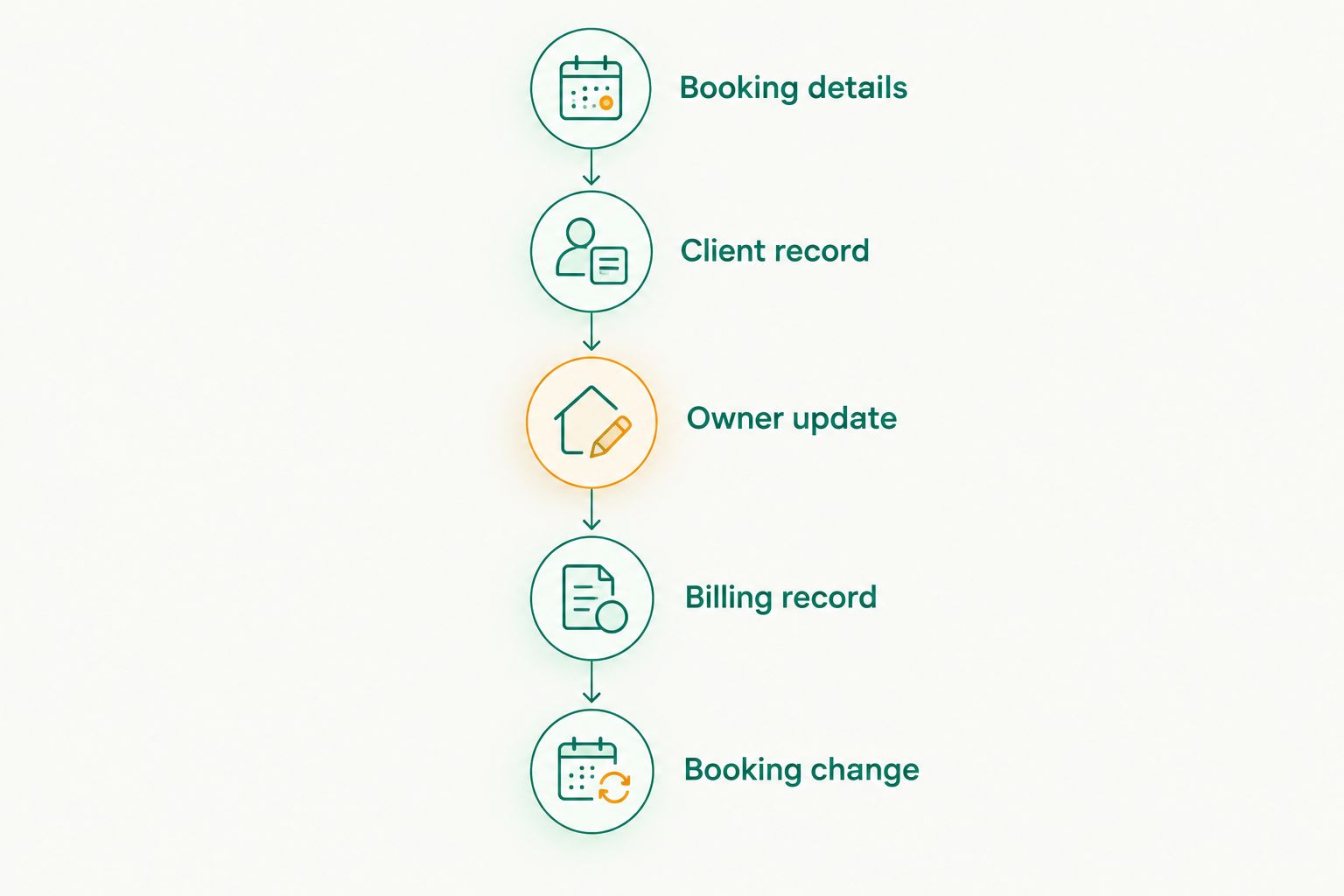
Record the extra steps each option requires. Choose based on the workflow you can maintain during an actual handover, not just the example that looked tidy before you changed it.
How we ranked these options
This ranking uses the stated product scope and the ordinary functions of spreadsheets, calendars and paper diaries. It is not a claim of hands-on product testing, measured time savings or a price comparison.
The order favours coverage of bookings, client records, owner communication and billing. The narrower options retain useful roles: flexible records, schedule visibility and handwritten notes. Their limitations follow from those roles, not from an invented score.
Which boarding option should you choose?
Petboard is the default recommendation for Indian home boarders seeking pet boarding software with bookings, client management, WhatsApp updates and GST invoicing. Check the specific fields and workflows you require before committing.
Choose a spreadsheet when you mainly need structured records. Choose a shared calendar when your main problem is scheduling. Keep a paper diary for handwritten check-in notes if you have a clear way to preserve changes.
For 2026, make one decision explicit: which record contains the final accepted booking? Supporting tools can remain useful, but they should not compete over the pet's actual arrival, departure or current instructions.
FAQ
What's the best pet boarding software for home boarders in India?
Choose a pet-business system when you need bookings, client management, WhatsApp updates and GST invoicing together. Check the exact booking and billing workflow before committing, rather than assuming every feature you need is included.
Can I run home boarding with a spreadsheet?
A spreadsheet can hold structured boarding records. You still need a defined process for confirming bookings, maintaining changes, sending owner updates and handling invoices.
Is a shared calendar enough for pet boarding?
A shared calendar is enough for schedule visibility, not for a complete boarding record. Keep client details, care instructions and billing information in records designed for those tasks.
What should I check in a boarding software demonstration?
Check a complete fictional stay, including a booking change. Find the client record, prepare an owner update and inspect an invoice so you can see where separate tools or manual steps are required.
Do home boarders need GST invoicing software?
Your invoicing needs depend on your business and applicable GST obligations. Confirm those obligations with your accountant, then check whether the software supports the required invoice information.
Can WhatsApp messages replace boarding records?
Keep the accepted booking and current care instructions in a designated record rather than treating a message thread as the whole system. When an owner sends a change, update the record you use to run the stay.
Should I stop using my paper diary after choosing software?
Keep the diary if it has a clear role, such as handwritten check-in notes. Transfer important booking and care changes to the designated record so the diary does not become a conflicting version.
One last thing
Before adopting any option, rehearse a changed departure date rather than another new booking. Then check the schedule, owner communication and billing record. Choose the workflow that keeps the changed agreement clear. A tidy original entry tells you less than a correction you can confidently follow.