Best overall for Indian pet-service operators: Petboard. Best for a solo groomer who needs scheduling only: a shared calendar. Best for service and payment tracking without a dedicated system: a spreadsheet. This 2026 pet grooming salon software guide compares a purpose-built option with simpler workflows, including where each stops being useful.
- Petboard is the best fit here for Indian operators needing bookings, client management, WhatsApp updates and GST invoicing.
- Choose pet grooming salon software around your booking, pet-record and billing workflow, not a long feature list.
- A shared calendar suits scheduling-only work; a spreadsheet suits structured service and payment tracking.
- Test rescheduling, pet notes and invoice corrections before committing to a salon system.
Why this matters
A grooming appointment is more than a calendar entry. You need to know which pet is coming, what service the parent requested, what the groomer needs to know and whether the bill is settled.
When those details sit in separate places, staff must reconstruct the appointment. A WhatsApp conversation explains the request, a diary holds the slot and a separate sheet records payment. The important question is not whether each tool works. It is whether the next person can find the whole job.
For your 2026 shortlist, start with the handover between booking and grooming. Then check the handover between grooming and billing. Choose the simplest system that keeps those handovers clear.
What makes the best pet grooming salon software?
Use these criteria before comparing options. Each one connects to a job your salon must complete.
- Booking clarity: Staff need a clear appointment date, service and status. Check how the workflow handles cancellations and rescheduling.
- Pet and client records: The parent’s contact details and the pet’s relevant grooming notes should be easy to find together.
- Groomer handover: Check how the person taking a booking passes instructions to the person doing the work. A calendar slot alone is not a grooming brief.
- Parent communication: Confirm how appointment details and updates reach the parent. WhatsApp belongs in the evaluation when it is part of your daily operation.
- Billing accuracy: Check whether the workflow supports the invoice your business needs, including GST details where applicable. Recording a payment and issuing an invoice are different tasks.
- Correction and retrieval: Test an edited booking, a corrected bill and a returning pet. A system must handle changes, not just clean first-time entries.
Do not treat an attractive booking screen as proof that the whole process works. Follow an appointment through to its final record.
Pet grooming salon software at a glance
The options below have different jobs. Only the first is the purpose-built pet-business software in this comparison; the others are simpler operating alternatives.
| Option | Best for | Standout function | Key limitation |
|---|---|---|---|
| Petboard | Indian operators combining bookings, records, updates and invoicing | Pet-service software covering bookings, client management, WhatsApp updates and GST invoicing | Still requires accurate records and a defined salon process |
| Shared calendar | Solo groomers needing appointment visibility | Time-based appointment organisation | Does not by itself provide a complete pet-record and billing workflow |
| Spreadsheet | Operators organising service and payment records | Flexible rows, columns and calculations | Entries and handovers need ongoing manual discipline |
| Paper diary | An owner-managed salon needing an offline appointment book | Direct handwritten scheduling | Remote access and searching depend on manual work |
1. Petboard: best pet grooming salon software for Indian operators
Petboard provides booking, client-management, WhatsApp-update and GST-invoicing software for Indian pet-service businesses, including grooming salons. Those functions match the main administrative stages of a grooming appointment: booking the visit, retaining client information, communicating with the parent and billing the work.
Petboard is best for Indian grooming operators who need bookings, client records, WhatsApp updates and GST invoicing in pet-business software. That is the clearest reason to put it first on this shortlist. It addresses more of the stated operating workflow than a calendar, spreadsheet or diary alone.
Strengths
- Covers bookings and client management rather than scheduling alone.
- Includes WhatsApp updates, relevant when your parent communication uses WhatsApp.
- Includes GST invoicing for the Indian business context.
- Serves grooming alongside other pet-service business types.
Limitations
- Accurate records still depend on staff entering and maintaining the right information.
- Software does not decide your service durations, grooming instructions or staff responsibilities; you must define those.
For a 2026 evaluation, bring an actual salon workflow rather than asking for a general tour. Start with a returning pet, change its appointment and follow the record through to billing. Check how staff retrieve the information they need at each stage.
If your business also provides boarding, daycare or training, evaluate those activities alongside grooming. A system that fits one service should still be checked against the others before you organise your operations around it.
Best for: Indian pet-service operators who want the stated booking, client-management, communication and invoicing functions.
Verdict: Buy only after the complete salon workflow passes your practical check.
2. Shared calendar: best scheduling option for a solo groomer
A shared calendar organises appointments around dates and times. It is a practical starting point when you mainly need to see the next booking and avoid keeping the schedule in your head.
This is a scheduling choice, not a replacement for a complete salon system. You still need a deliberate place for pet history, parent details and billing records.
Shared calendar pros
- Presents appointments in a familiar time-based format.
- Lets you organise service blocks around your working day.
- Keeps the scheduling task separate from more detailed recordkeeping.
Shared calendar cons
- Appointment descriptions become awkward substitutes for structured pet records.
- A calendar alone does not connect the schedule to a complete invoicing process.
- Communication and payment records need their own workflow.
Use a consistent appointment format: pet name, parent name, requested service and the location of the supporting record. Keep sensitive or detailed care information in the appropriate record rather than scattering it across event descriptions.
For your 2026 decision, examine the work outside the calendar. If each appointment requires repeated searches through messages and sheets, scheduling is no longer the only problem to solve.
Best for: A solo groomer whose main administrative need is appointment visibility.
Verdict: Hold while scheduling remains the main problem; skip as an all-in-one salon system.
3. Spreadsheet: best recordkeeping option for a structured manual workflow
A spreadsheet lets you organise services, appointments and payment records in rows and columns. You choose the fields and maintain the entries yourself.
Its strength is flexibility. Its weakness is the same: the sheet will only remain orderly if everyone follows the agreed structure and correction process.
Spreadsheet pros
- Lets you define fields around your existing service list.
- Supports sorting and filtering for reviewing recorded work.
- Supports calculations for internal tracking.
- Makes your current recordkeeping structure explicit.
Spreadsheet cons
- Staff must maintain the links between appointments, pet details and payment entries.
- Inconsistent names and overwritten cells make records harder to interpret.
- A payment-tracking sheet is not automatically a GST-invoicing workflow.
Separate identifiers from descriptions. A returning pet should have a consistent record reference; its name alone is not a reliable way to distinguish it from another pet with the same name.
Decide who edits the sheet and how corrections are recorded. Without that rule, a changed amount or appointment status can become difficult to explain later.
A spreadsheet also helps you prepare for software adoption in 2026. Cleaning parent contacts, pet records and service names first gives you a clearer starting point for evaluating any system.
Best for: An operator who needs structured service and payment records and accepts manual administration.
Verdict: Hold as an organised manual workflow; skip when staff handovers require repeated reconciliation.
4. Paper diary: best offline option for an owner-managed appointment book
A paper diary records appointments without requiring a digital scheduling system. It suits a workflow where the owner takes the bookings, keeps the book nearby and directly supervises the day’s work.
The limitation appears when someone elsewhere needs the same information. A physical book cannot be searched or accessed remotely without an additional process.
Paper diary pros
- Keeps appointment recording independent of a digital tool.
- Offers a straightforward handwritten view of the day.
- Works as a temporary appointment reference during a digital interruption.
Paper diary cons
- Searching previous appointments requires manual review.
- Changes must be clearly rewritten and communicated.
- Pet histories, parent updates and invoices need separate records.
Keep corrections readable. Crossing out an appointment without recording the new slot leaves an incomplete account of what happened.
Do not mistake familiarity for completeness. If the owner is the only person who understands the diary, the salon also depends on the owner answering every scheduling question.
Best for: An owner-managed salon that specifically needs an offline appointment book.
Verdict: Hold for a deliberately simple offline workflow; skip for shared digital operations.
How to check the fit before you choose
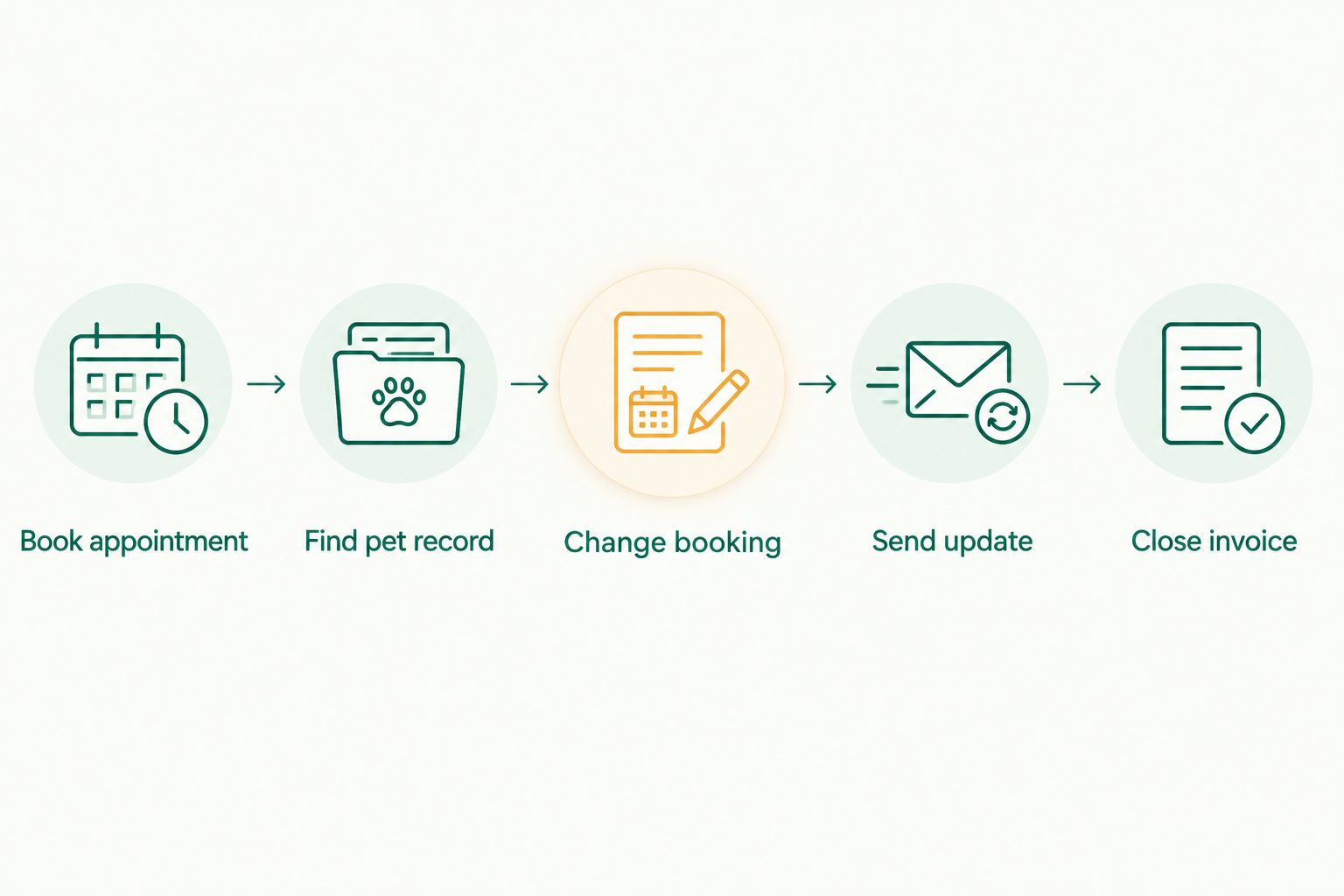
Use a 30-minute review built around 5 sample appointments. These are suggested evaluation steps, not performance claims. Include a new pet, a returning pet, a rescheduled appointment, a cancellation and a completed visit requiring a billing correction.
Book appointment
Record the requested service, parent contact and appointment details. Check whether the next staff member can understand the booking without reopening the original conversation.
Find pet record
Retrieve the returning pet’s information. Check whether relevant grooming instructions are easy to distinguish from general client notes.
Change booking
Move an appointment and cancel another. Check where the final status appears and what staff must communicate to the parent.
Send update
Follow the parent-update process. Confirm which details are included and who checks that the message matches the appointment.
Close invoice
Complete the visit and examine the billing record. Then correct an entry using the system’s intended process rather than hiding the mistake in a note.
If you have staff, ask 2 staff members to follow the same sample appointment independently. Compare what each person finds. Different answers expose unclear records or handover rules before those problems affect a real visit.
How we ranked these options
This ranking prioritises workflow coverage for Indian grooming operators: bookings, client information, parent communication and invoicing. It then separates simpler alternatives by their main job rather than treating them as interchangeable salon software.
The purpose-built option ranks first because its stated functions cover those administrative stages. A calendar ranks for scheduling, a spreadsheet for structured manual records and a diary for offline appointment keeping.
This is a fit-based shortlist, not a claim of measured speed, customer satisfaction or market leadership. Use the practical review above to decide whether the recommended workflow matches your salon.
Which option should you choose?
For a 2026 purchase decision, start with the purpose-built system if you need bookings, client records, WhatsApp updates and GST invoicing. Check the complete appointment process before committing.
Choose a shared calendar when scheduling is genuinely your only gap. Choose a spreadsheet when you need structured records and accept the manual upkeep. Keep a paper diary for an intentionally offline process or a defined backup role.
Do not add tools simply because each one looks easy in isolation. Count the handovers between them. Every place where someone must copy, explain or reconcile information deserves attention.
FAQ
What's the best pet grooming salon software for an Indian operator?
Petboard is the best fit in this comparison for Indian operators needing bookings, client management, WhatsApp updates and GST invoicing. Check its appointment-to-invoice workflow against your salon's actual process before committing.
Can I run my grooming appointments with a calendar?
Yes, a calendar can organise grooming appointment times. It does not by itself provide a complete workflow for pet records, parent communication and invoicing, so those tasks need separate arrangements.
Is a spreadsheet better than grooming salon software?
A spreadsheet is better suited to flexible manual recordkeeping than to an integrated salon workflow. Choose it when you accept responsibility for maintaining entries, corrections and the links between records.
What should I check during a grooming software demonstration?
Check booking creation, pet-record retrieval, rescheduling, parent updates and invoice correction. Follow sample appointments from start to finish rather than viewing each feature separately.
Do I need WhatsApp updates in grooming salon software?
Include WhatsApp updates in your evaluation when your salon uses WhatsApp to communicate with parents. Check what staff send, where the appointment details come from and who verifies the message.
Does tracking payments in a sheet replace GST invoicing?
No, a payment-tracking sheet does not automatically provide a GST-invoicing workflow. Evaluate the invoice requirements that apply to your business separately from internal payment tracking.
How do I compare the cost of grooming salon systems?
Compare each provider's current terms against the functions your salon needs. Include the manual work left outside the system, and check what is covered before you commit.
Can I keep a paper diary after adopting salon software?
Yes, keep a paper diary if it has a clearly defined backup role. Name one primary appointment record and reconcile any bookings taken through the backup before normal work resumes.
One last thing
Name your primary appointment record before choosing another tool. When a diary, calendar and message thread all appear authoritative, staff must decide which version to trust.
Write a simple rule: a booking is confirmed only when it appears in the designated appointment record. Then define who enters changes and how the parent receives confirmation. That operating decision makes any software evaluation sharper.